Pages

.
Showing posts with label computer. Show all posts

Saturday, 14 March 2015

CryptoLocker: A really nasty virus


The name is CryptoLocker. It is said to be the nastiest virus around.

Once you get it, you'll be getting into trouble... a big trouble.

Here's the explanation of the said virus;

The so-called "CryptoLocker virus" is an example of ransomware, a class of malware that, once it has infected a particular computer system, restricts access to that system until the user pays a ransom. CryptoLocker is a particular form of ransomware known as cryptoviral extortion, a scheme in which key files on the system's hard drive are encrypted and thus rendered inaccessible to the user unless and until that user pays a ransom to obtain a key for decrypting the files. 

The CryptoLocker worm is generally spread via drive-by downloads or as an attachment to phony e-mails disguised as legitimate messages from various business, such as fake FedEx and UPS tracking notifications. When a user opens such a message, CryptoLocker installs itself on the user's system, scans the hard drive, and encrypts certain file types, such as images, documents and spreadsheets. CryptoLocker then launches a window displaying a demand for ransom (to be paid in less-traceable forms such as Bitcoins and Green Dot Moneypaks) and a countdown timer showing the date and time before which the user must submit payment in order to obtain the decryption key before it is destroyed. -source-


You cannot get rid of this virus unless you wipe your computer completely.

But there are some ways to prevent your computer from being affected. Pretty much the same as how you prevent yourself from getting other virus! 


Taken from ezelovesse7en

P/S: Since the warning is still running around, I guess no one has found a way to solve this issue yet.


Saturday, 29 November 2014

Problem solved: Problem opening Microsoft OneNote application


Referring to this entry, after I had published the post, onenote community had responded to my tweet regarding my problem. Mind you, networkblogs automatically published all my blog and tumblr on twitter and facebook which is quite handy because I don't have to do it by myself. 


Enough ranting, what I want to say is actually, the Onenote community suggested a method to solve the problem.


Though I was a bit late to notice this. (I rarely go on twitter, I rarely rarely do). So by the time I saw this, I already solved my own problem. So, I didn't get the chance to try this method. I believe this is a shortcut to my ever long method.

All I did was, cleaning all the .temp files in my computer (local c/windows/temp) and then some other TEMP folders that I found in every path (sometimes Diskcleanup cannot do this, so I have to do it manually). And then, I know I should't do this, but I also deleted all the files in the prefetch folder (local c/windows/prefetch).

Aaaannndd... it works like magic. So, I don't have to run as an administrator to open the program ~which is a pain in the ass where you have to wait and click, yeah! it's a butthurt~

P/S: Hmmm... I will try the suggested method if I were to have this problem again.

Tuesday, 18 November 2014

Recovering deleted files


I thank you for the question. I was planning to make this entry long time ago.

I can give you a very easy method to recover the data back (if it is still not too late).

Just download Recuva and run it.

Let it do the work for you. This software is pretty much easy and user-friendly. It's free too. Once you run it, you'll understand how it works. 

And I really really recommend this software. I'm using it and I am satisfied with it, so I don't go and search for other softwares This one is good enough to sit in your system.

There are also some other softwares which are very helpful but I am too lazy to google for them.

P/S: Probably I should make another entry about recovering data from your damaged/crash hard disk. Yep... I should... I think, but later (or no at all)

Monday, 17 November 2014

Problem opening Microsoft OneNote application : OneNote is unable to start


So, I was trying to open my Office One note application (I like this program actually). I normally have no problem opening it, but then something happened and suddenly this warning appeared. 


I was confused at first, this never happened before. So, I cleaned up my disk space, hoping that I would be able to open it some time later. But unfortunately it didn't. The same warning message appeared again.

This got me upset. Hey, I am the admin here... but then it came to my mind... if this has something to do with administrator, then I can just run as administrator right?

With  that little knowledge I have combined with the guidance of my instinct, what I did was,


Right -lick on the One Note icon --> properties

A windows as below will appear,

Tick the "Run this program as an administrator"


Granted, it worked!

Probably this isn't that much, but if you were happened to stumble upon the same problem, then, this is one of the solutions. 

Probably there are still some ways to do it without having to "run the program as admin" and currently I'm trying to figure it out.

If I disable the option, I still get the same warning message.

Updated: 29/11/14

P/S: When it comes to this matter, I rely too much on my instinct. It's weird! But this instinct saved my laptop many times.


Sunday, 5 October 2014

Stopping unwanted windows from popping up


Pretty sure I understand what this anon wants. But the thing is, what kind of windows that pops up? Is it a script? Is it a warning? Or just some random windows that who-the-hell-knows-what-it is? Or maybe a windows of unknown program? Or even internet browsers? Could it be virus?

We don't know for sure. It depends on what kind of windows that suddenly appears on your screen.

It could be a warning, a script, a virus, advertisement, a program/software or an incomplete installed program/software (you know, when you in the middle of installing and then something happened, with little of this and little of that, the installation completed. Then when you open the program, it didn't run or maybe it did but your computer stopped responding)  or some other problem that I haven't stated here.

But whatever it is, all we want is to get rid of that annoying windows/unwanted software or whatever you called it.

You can stop the program from running again using taskmanager.
*make sure you know what is the name of the program that you want to kill.

If it doesn't work, go to msconfig.
*make sure you know what is the name of the program that you want to terminate.

So far I have been doing these steps to solve this kind of problem. I bet with only taskmanager will solve the problem. But this only applies if the program/software listed in the taskmanager.

Hope this helps you.

p/s: I don't know if I quote the title right. But well...

Wednesday, 2 April 2014

Tutorial : How to make gif image from video


Tools : Adobe Photoshop CS4 (I swear you are going to use this, a lot); Camstudio (to cut video)
* This tutorial is for those who already have basic knowledge about Photoshop? wait... er... can I say intermediate user? :p

As per request, 


But I am not going to explain what is *gif because I know little or nothing about that. What I know is the image is moving. Yeah... moving like sooo ~ahahaha... general knowledge~.

This entry is created just to show you how to make *gif from imported video... er... not exactly ripping the content from the whole video. Just take certain part that you want to turn into *gif.

First thing first, cut the video using any software that you familiar with. As for me, I use camstudio ~the audio sucks. Wait! gif has no audio involved~.

Save the file. At least you know that's the file you want to work on with.

OPEN PHOTOSHOP APPLICATION
Open the ANIMATION PANEL first. If you don't have any idea, look at the picture below. 
*click image to enlarge

IMPORT VIDEO
Just make sure you know which file/video you want to work with.
Go to FILE --> IMPORT --> VIDEO FRAMES TO LAYER
Notes: 
- The video shouldn't be too long or else the the photoshop will automatically delete the last part.
- Make sure the format is in *mov/*avi/*mpg/*mpeg
*click image to enlarge

xXxXxXxXxXx

As for this part, you have three options. After selecting one option, hit "OK".

If the video is kinda short, you can just select the "FROM BEGINNING TO END". 

If youwant to select certain range of the video, then choose the "SELECTED RANGE ONLY"
1. Put your cursor over the slider and drag it to a certain part. That's where you STARTING POINT is.
2. Hold SHIFT key and drag the slider to the right where you want it to end. That's your ENDING POINT.
3. In between is the selected part of the video you will import into the platform.

If the video is kinda long, and you just not sure what to do with it, you can choose the last option; "LIMIT TO EVERY [insert amount of] FRAMES" ~I rarely tick this option, unless the part that I cut is long and I don't cut any~

*click image to enlarge

Once you imported the video, you can see there are two panels with lot of images. One in the LAYERS PANELS and the other one in the ANIMATION (FRAMES) PANEL.

Make sure you focus on the ANIMATION (FRAMES) PANEL below the platform.

Now the video is divided into frames. You may click on each frame to understand better. ~meh! too hard to explain, I don't know how to put in words.

*click image to enlarge

If you notice, each of the frame has time. I think you know what's the purpose, no need to explain, no? So, play around with it for a while. ~For each frame, 0.2 second is better. But if you have text, you either duplicate the frame two or three times or extend the time for about 0.5 second~

*click image to enlarge

EDITING IMAGE/FRAME
Delete frames that you don't want to appear in your *gif by selecting the frame and hit the RUBBISH icon at the bottom of the panel.
Hit "YES" to discard the unwanted frames.

*click image to enlarge
NOTES:
The image in the ANIMATION PANEL is like a shortcut of the original image in the LAYERS PANEL.
If you delete an image/frame in the ANIMATION PANEL, the image is still exist in the LAYERS PANEL.
But, if you delete the image in the LAYERS PANEL, the image is no longer exist in the file.
To simplify, just assume LAYERS PANEL is where your original file is. The ANIMATION PANEL is just a shortcut to that file. ~easy enough?~


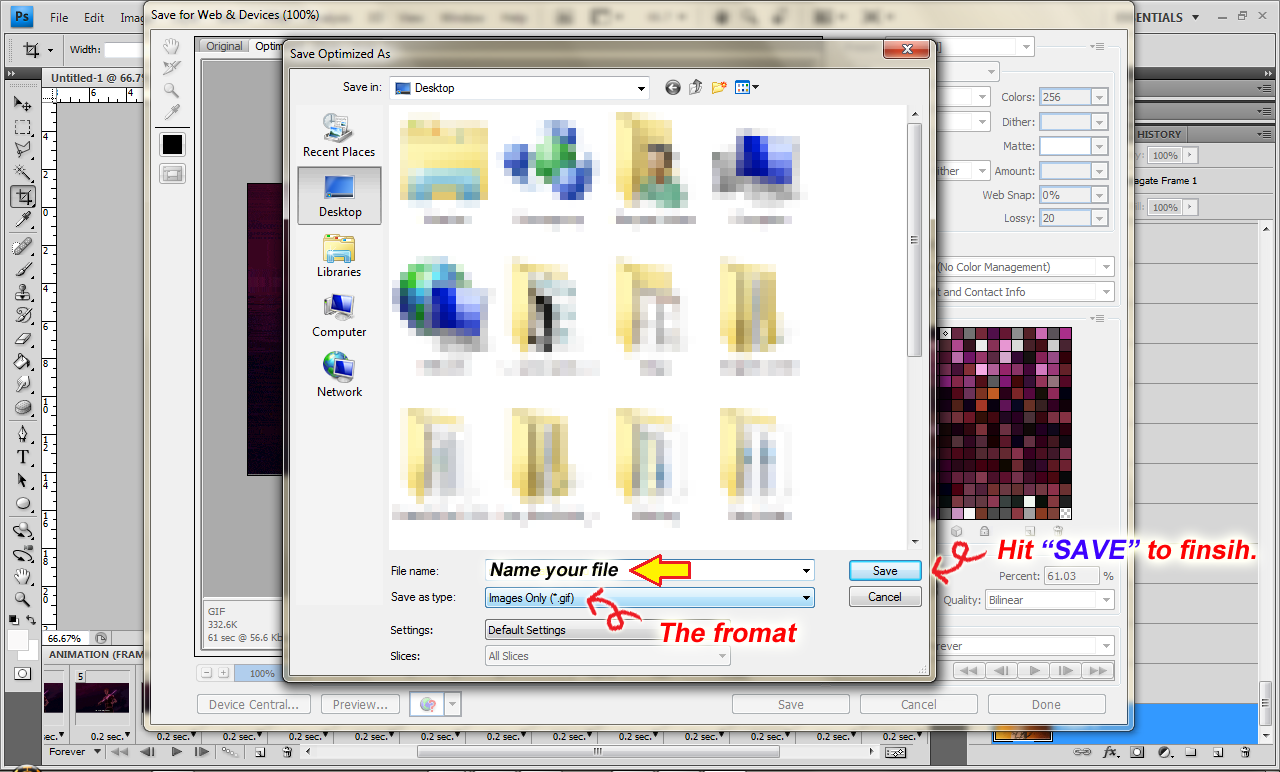
SAVING FILE
Saving *gif file is not the same as saving other image file. You are not going to use the "SAVE" or "SAVE AS" options.

But rather, publishing the image... er... sorta ~ugh! that's what I understand. Have no f*ckin' idea~

REMEMBER! REMEMBER! and ALWAYS REMEMBER! to select the SAVE FOR WEB AND DEVICES ~please don't ask me why~.


*click image to enlarge

If you want your *gif keeps playing the whole time, just choose "FOREVER" in the LOOPING OPTIONS.

Also, you may ignore the IMAGE SIZE because photoshop normally using the original size. 

Just in case you want to publish in a web which allows certain size, you can just adjust the size in that option.

When you click the "SAVE" button, another new windows will pop up. Picture below.

*click image to enlarge

And so, the final product...

Gintama 276

P/S : So much fun writing... ho ho ho... Any uncertainty, you can ask Mr.Google or just comment below :$

Saturday, 8 February 2014

Resuming interrupted download without restarting from the very beginning


Just when you are about to finish your download, something happened that your download suddenly stopped downloading.


Then you hit the "Pause" button and restart the download.
OK... fine, the download resumes. 

But what if, when you hit the "resume" button, a warning "cannot resume" appears.

Like this,

or this,

Depends on your Download Manager.

Don't "RESTART" or "REMOVE" the download file.

You still can resume the download from where its stops even though you've got such alert.

All you have to do is, go to the sites (where you download the file) and copy back the download URL.


Back to your download manager,

"Pause" the current download.

Right-click and go to "Properties"

This windows will appear.
||
V
Paste the new URL you just copied into the URL field.

Click "RESUME" and see the result?


Same things you can apply if you use IDM or Orbit Downloader. ~OK! Because I used those so, I just mentioned them. But I think, you can apply this to any download manager you use.~


The reason you "cannot resume" because the download link has expired. So in order to resume, you need to refresh the link. ~There are so much I want to explain but I don't think you care either, so I keep that for myself lor~ 

Even so, there'll be several websites that this trick won't work. I'm not sure which one because I haven't encountered them yet.

But so far, this works just fine and the file is not corrupted either.

P/S : Amboi title aku... panjang sey!

Wednesday, 15 January 2014

"attrib" is not recognize as an external or internal command, operable program or batch file"


One of my readers asked me this question long time ago . Not that I didn't answer, I did but, to go and find it in the comments, sure damn annoying. So I think, I wanted to separate this case to be a stand alone entry.

So here was the Q;

"'Attrib' is not recognize as an external or internal command, operable program or batch file"

>>here<<

If you ever come across this type of problem, first thing you must do is check whether attrib.exe is still present in the system. 

HOW?

Go to your local drive --> windows --> system32 and find attrib.exe.

If you don't see it. Then move on to the next step to unhide all the hidden files and folders in your system.

In the menubar, point to TOOLS --> FOLDER OPTIONS.

In the VIEW TAB, scroll until you find the HIDE PROTECTED OPERATING SYSTEM FILES. Untick this option. APPLY --> OK


Don't get it? >here<

Then look again for attrib.exe

If you don't find it there, so yeah... obviously it went missing, or had been renamed or moved from the original path or accidentally had been deleted.

HOW TO FIX?

You need to reinstall the attrib.exe.

If your have the OS CD, then you can just install it manually using the CD.

But, if you don't have the CD, then you have Mr.Google. I'm sure there'll be some available download sites for this type of file.

Why the hell did I post about this?
Can't I? This is my blog.

Anyway, attrib.exe is important because if you are the type who love to hide your files or folders, then, this is how it works. It helps you to change the attributes of a file/folder.

P/S : I feel lazy this lately... actually almost every time.

Wednesday, 8 January 2014

Checking for virus/malware : using MSCONFIG


Now let's continue with the easiest part. Here, we are going to play with MSCONFIG a.k.a MICROSOFT SYSTEM CONFIGURATION UTILITY. ~This wouldn't be long as my previous posts. I swear~

You can use msconfig to enhance your PC performance where you can select which programs can and cannot run in your system during startup.

If your computer runs slow during the startup, it might be caused by several programs loading took up quite a lot of memory during the process. So, this utility is helpful in that matter to boost up the speed of your PC.

Sometimes, when your PC starts to run slow during the startup, there is a possibility that a virus might also "working" during the start up. 

And sooo you need to check what type of programs run in your startup, a software or a virus ~ I think, it will take long too. I take back my previous promise~  as well as terminating the programs/virus forever.

* There'll be a virus... the stubborn one... that will always get in your way. You'll understand what I mean once you find one.

While msconfig did not delete the virus, it is very helpful in order to terminate and prevent the virus from running in your system every time you run your PC or laptop.

**Again with that lot of BS~ let's get down to business.**

First, open MSCONFIG.

Go to RUN and type msconfig in the empty field. Hit OK.

A System Configuration windows will pop up.

Select ''services" tab to see list of services that operate in your system. You can select "disable" to stop unnecessary services from running in your PC.


In my case, I stopped the Google Update. It's not that necessary as it would take up necessary resources that sometimes will make my laptop runs slow.

***Just a reminder!! sometimes google update is a malware/ virus. So, you need to be familiar with its activity. That's why you need to also check in in your taskmanager and regedit.

Move on, go to "startup" tab.

Here, you can select which programs should load during the startup.

Since there are lot of unknown stupid programs running in my system, I disabled all those that you can see in the lists. Two of them are virus namely HJRUDZ5DT2 and PDFCreator (was infected).


Since you can detect it, run your antivirus on that specific location. If your antivirus could detect it as one, it'll be automatically removed.  If not, then you have to do it manually by locating the virus in the said location given.

Picture below showed the exact location of the virus in my registry editor.


Since I know where it is now, I went and proceed to delete it using regedit ~soon will be posted~

**Just a note;
HKCU - HKEY Current User
HKLM - HKEY Local Machine

See, isn't that easy?

If you are unsure, well... google | yahoo | bing it!

Link/s;-
> Using CMD - Part 1 <
> Using CMD - Part 2 <


P/S : Woah! I never thought that I'll be able to post all those methods here. I'm sooo amazing!

Friday, 3 January 2014

Broadband reached its quota limit


Your broadband reached its quota limit?

Let's play some dirty little trick.

First, download >> ultrasurf <<

Once you have it, save it in your PC/laptop, extract the file.

Second, connect your broadband. Wait. Then try to surf the internet for a little while. 

For maxis user, you'll get a message saying that you already reached your quota limit.

For celcom, I think, you can surf just fine.

Third, activate ultrasurf.


You might as well want to play with the option for your own preference.

Then, you can surf as usual though it might be slow a little bit.

Ultrasurf comes with it's own Internet explorer windows. Use that when you are surfing.

Oh yes... use this when you already reached your quota limit.

P/S: too lazy to explain more
Related Posts Plugin for WordPress, Blogger...
 

sum o' spies